UNIT FRAMES
Four frame styles
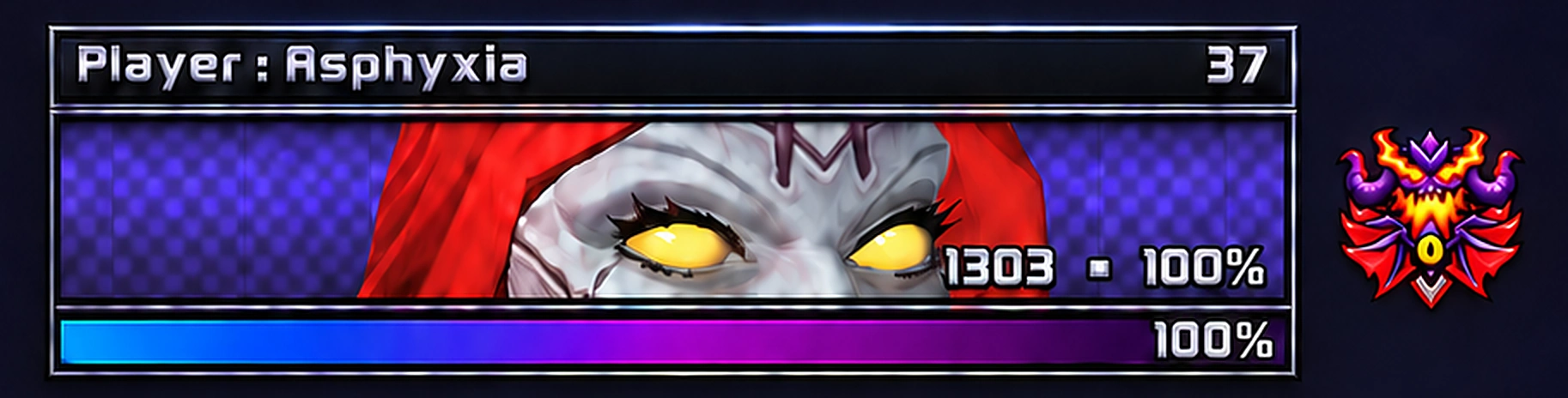
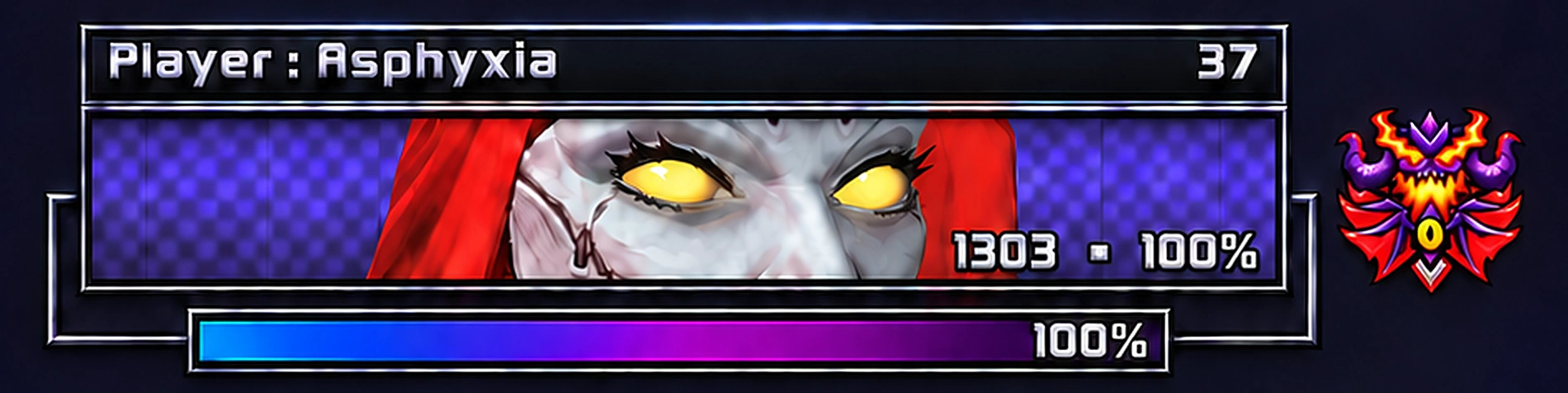
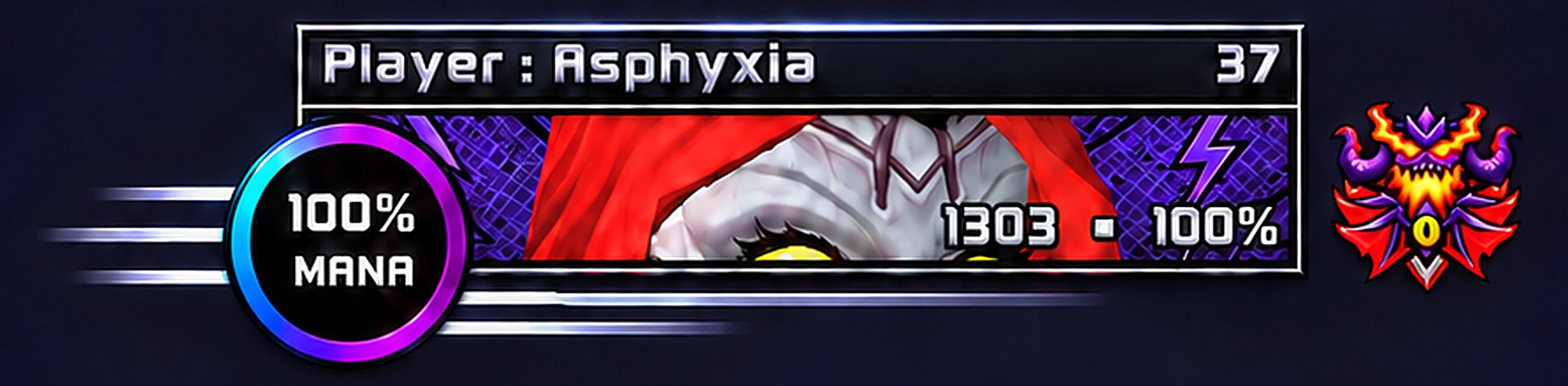
Player, target, focus, pet, party, raid, boss and arena frames in four styles: skull-art Morph, classic Norm, clean Eclipse, or Dark Matter with its power ring.
Asphyxia-UI replaces your unit frames, bars, bags, chat, map and Blizzard windows with one dark, neon-lit design: gunmetal panels, cyan-to-pink accents and skull artwork, made only for WoW Forever.
From the health bar under your thumb to the profession window you open once a week, everything shares the same surfaces, fonts and accents.
Player, target, focus, pet, party, raid, boss and arena frames in four styles: skull-art Morph, classic Norm, clean Eclipse, or Dark Matter with its power ring.
Configurable action bars with fading and geometry controls, plus nameplates, cast bars, auras and tooltips tuned for fights.
Built in-house: category headings, search, favorites, quality accents and a two-click Sell gray that never touches favorites.
A themed face for WoW Forever's native damage meter, with compact and split layouts and class icons. Toggle with /adps.
Target markers, a marker wheel, ready-check display and pull and break timers, ready when you lead.
The map, quest log, professions, flight map, mail and more pick up Asphyxia panels and Ironclad type automatically.
Pick a unit frame style in /asp > Unit Frames. Each one keeps your other settings, so you can switch between them.

Every panel, border and accent follows the scheme you pick in /asp. Tap one to tint this page.
Swatches are a web preview of each scheme's mood, not exact in-game values.
Type these in chat to get where you need to go.
/aspOpen the main configuration/aspinstallRun the guided installer/aspbagsToggle the bag window/adpsToggle the damage meter/aspdps configDamage-meter settings/asprcOpen Raid ControlKeep your WTF folder when you upgrade and your profiles carry over.
WTF folders.Asphyxia-UI.zip and extract it.Interface/AddOns with the new Asphyxia-UI folder.The Asphyxia-UI community lives on Discord. Post your screenshots, share your own edited version of the UI, or get help. Moderators keep it clean.
Post screenshots of your Asphyxia-UI layout, frame style, colors and raid setup. Images, GIFs and short clips welcome.
Post a screenshotMade your own version? Share it with the community. The license allows it when you:
Large files: post a download link (GitHub release, Google Drive). Community uploads are not checked by us; download at your own risk.
Share your versionStuck or found a bug? Ask in support with your build number (type /asp to see it) and a screenshot.
Prefer GitHub? Report a bug or suggest a feature on GitHub Discussions.
Asphyxia-UI is free. Join the community, watch the build videos, or chip in to keep development going.
Community and donation links are coming soon.
Grab the latest validated build. It's packaged automatically from every change that passes testing.
Download Asphyxia-UI.zip© 2026 Asphyxia (Rez I.). Free and community-friendly. Full terms below.
Inspiration acknowledgments recognize creative influence; they do not imply endorsement or collaboration.
Asphyxia-UI
Copyright (c) 2026 Asphyxia (Rez I.).

Asphyxia-UI is free, community-friendly software. This license covers the
original material owned by the copyright holder ("Asphyxia-UI material"):
project-owned code, artwork, textures, fonts without their own license, and
documentation.

PERMISSIONS
Free of charge, anyone may:
  1. Download, install, use and back up Asphyxia-UI.
  2. Modify it, including creating plugins, edits, forks and derived UI packs.
  3. Share copies of Asphyxia-UI, original or modified, with others.

CONDITIONS
These permissions apply only while all of the following are met:
  a. Credit. Keep this LICENSE file and the copyright notice in every copy, and
     state in the download page or description that the work is based on
     Asphyxia-UI by Asphyxia (Rez I.).
  b. Mark modified versions. A modified version must say clearly that it is
     modified and unofficial, and must use a name other than "Asphyxia-UI" on
     its own (for example "MyPack, based on Asphyxia-UI"). It must not suggest
     it is endorsed by, or comes from, the copyright holder.
  c. No money. No one may make money from Asphyxia-UI material or any work
     based on it without prior written permission from the copyright holder.
     This includes, among other things: selling it; charging for downloads,
     access, early access, support or installation; paywalls, subscriptions
     or membership-only content (such as Patreon tiers); donations, tips or
     sponsorships connected to it; advertising-supported or link-shortener
     download pages; and bundling it in a paid product or service.
  d. Same terms. Anything you share that contains Asphyxia-UI material must be
     shared under this same license, free of charge.

Written permission for commercial use may be requested from the copyright
holder and is granted only case by case. Permission given to one person does
not extend to anyone else.

If any condition is broken, the permissions in this license end for that
person until the copyright holder restores them in writing.

THIRD-PARTY MATERIAL
This notice does not claim ownership of, relicense, or grant rights to third-party
code, fonts, textures, artwork, trademarks, or other material. Such material remains
subject to its own licenses and permissions, which take precedence for that material.
See the included third-party notices and Media/IMPORTED-MEDIA.txt.
In particular, this notice does not grant permission to redistribute Baganator or
Syndicator. Their inclusion requires authorization from their rights holder.
Original font packs that include their own license file are covered by that file.

LIBSHAREDMEDIA COMBINATION EXCEPTION
In addition to the permissions above, recipients may reverse engineer Asphyxia-UI
for debugging their modifications as required by LGPL v2.1 section 6, including
using an interface-compatible modified LibSharedMedia library. This permission
applies to project-owned code; the library and other third-party components
retain their own terms. See THIRD-PARTY-NOTICES.txt and
Libs/LibSharedMedia-3.0/LICENSE.txt.

DISCLAIMER
To the extent permitted by applicable law, Asphyxia-UI is provided "AS IS",
without warranties of any kind, express or implied. The copyright holder is not
liable for claims, damages, or other liability arising from its use, including
the use of modified versions made by others.
LibSharedMedia-3.0
Author: Elkano (elkano@gmx.de); inspired by SurfaceLib by Haste/Otravi.
Bundled revision marker: 176; library minor version: 12000002.
Source: https://repos.wowace.com/wow/libsharedmedia-3-0/!svn/bc/176/trunk/LibSharedMedia-3.0/LibSharedMedia-3.0.lua
License: GNU Lesser General Public License version 2.1.
The library and its use are covered by that license; its complete text is in
Libs/LibSharedMedia-3.0/LICENSE.txt. Readable source is included in that folder.
The bundled copy has compatibility changes (bit32 fallback and optional
C_UIFileAsset.IsKnownFile). These were already present when inspected on
2026-10-10; the historical edit dates have not been established in this audit.
This source is not an unmodified upstream distribution.
To use a modified copy, edit/replace its Lua file with an interface-compatible
version and restart WoW. Another addon's newer library can take precedence
through LibStub; disable that addon when testing a replacement in isolation.
No warranty is provided, as specified in the accompanying LGPL license.

LibStub
The bundled file explicitly places LibStub in the public domain.
Credits retained in source: Kaelten, Cladhaire, ckknight, Mikk, Ammo,
Nevcairiel, joshborke.

CallbackHandler-1.0
Bundled library minor version: 8, upstream revision marker: 26.
Project: https://www.curseforge.com/wow/addons/callbackhandler
Published license: BSD, reproduced in Libs/CallbackHandler-1.0/LICENSE.txt.
The published notice contains placeholders; these are retained verbatim,
not replaced with invented copyright information. The bundled source also
has a securecallfunction compatibility fallback. Existing attribution is retained.

The library notices above cover those three shared-media libraries only. They do not grant
rights to unrelated code or assets. See other included notices and
Media/IMPORTED-MEDIA.txt. Media registration does not change an asset's license.


THIRD-PARTY FONT FAMILIES (added 2026-10-18)

Bespoke
Copyright (c) 2016, Metaflop (http://www.metaflop.com), Simon Egli, Marco Mueller, Alexis Reigel, with Reserved Font Name Bespoke.
Distributed under the SIL Open Font License 1.1 option of the original dual GPLv3/OFL license.
The supplied OFL template is preserved verbatim; its placeholders are identified by the original font metadata above.
Notices: Media/Fonts/Packs/ThirdParty/Bespoke/

Eightgon
Copyright © 2024 GGBotNet (https://ggbot.net), with Reserved Font Name "Eightgon".
SIL Open Font License 1.1. See OFL.txt.
Notices: Media/Fonts/Packs/ThirdParty/Eightgon/

ControlFreak
© 2001, Graham Meade. All rights reserved.
Author-defined freeware terms, reproduced verbatim in LICENSE.txt. Unmodified fonts bundled with the free addon. Do not modify for redistribution or sell these fonts.
Author license source: https://st.1001fonts.net/license/control-freak/readme.txt
License checked: 2026-10-18.
Notices: Media/Fonts/Packs/ThirdParty/ControlFreak/

These fonts retain their own licenses, copyright notices, and original names.
The project-owned-material restrictions in LICENSE do not relicense these fonts.


Gputeks
Copyright (c) 2008, gluk (gluksza@wp.pl), with Reserved Font Name Gputeks.
SIL Open Font License 1.1. Original regular/bold font binaries are unchanged.
Source: https://www.glukfonts.pl/font.php?font=Gputeks
License and credits: Media/Fonts/Packs/ThirdParty/Gputeks/

Trueno
Original design: Julieta Ulanovsky (copyright 2011-2015).
Design modifications and new weights 2015: Jasper / Cannot Into Space Fonts.
Derived from Montserrat; its original Reserved Font Name notice is preserved.
SIL Open Font License 1.1. Supplied font binaries are unchanged.
Source: https://www.fontspace.com/trueno-font-f22345
License, credits and original FONTLOG: Media/Fonts/Packs/ThirdParty/Trueno/

The fonts remain separately licensed under the OFL, not Asphyxia-UI's
project-owned-material license. No author endorsement is implied.


ARMORY GEARSCORE CALCULATION (added 2026-11-18)

The compact Classic/Forever GearScore calculation in Modules/Armory.lua adapts
the coefficient and slot-weight calculation in TacoTip's gearscore.lua.
TacoTip is based on the original GearScoreLite by Mirrikat45 and others.
Source: https://github.com/ssdeanx/TacoTip-Gearscore-TBC/blob/1f9222276683b97bfbc0333a55461de97739795a/gearscore.lua
Formula/client comparison and changes are documented in
Docs/Armory-Equipment-Metrics.md. No external GearScore addon or library is
bundled. The adapted portion remains under its MIT license; the project-owned
material restrictions in LICENSE do not replace these permissions.

MIT License

Copyright (C) kebabstorm (Original TacoTip — https://www.curseforge.com/wow/addons/tacotip-gearscore-talents)
Copyright (C) 2026 AcidBomb

Permission is hereby granted, free of charge, to any person obtaining a copy
of this software and associated documentation files (the "Software"), to deal
in the Software without restriction, including without limitation the rights
to use, copy, modify, merge, publish, distribute, sublicense, and/or sell
copies of the Software, and to permit persons to whom the Software is
furnished to do so, subject to the following conditions:

The above copyright notice and this permission notice shall be included in all
copies or substantial portions of the Software.

THE SOFTWARE IS PROVIDED "AS IS", WITHOUT WARRANTY OF ANY KIND, EXPRESS OR
IMPLIED, INCLUDING BUT NOT LIMITED TO THE WARRANTIES OF MERCHANTABILITY,
FITNESS FOR A PARTICULAR PURPOSE AND NONINFRINGEMENT. IN NO EVENT SHALL THE
AUTHORS OR COPYRIGHT HOLDERS BE LIABLE FOR ANY CLAIM, DAMAGES OR OTHER
LIABILITY, WHETHER IN AN ACTION OF CONTRACT, TORT OR OTHERWISE, ARISING FROM,
OUT OF OR IN CONNECTION WITH THE SOFTWARE OR THE USE OR OTHER DEALINGS IN THE
SOFTWARE.
The license and notices are also included in every download (LICENSE and THIRD-PARTY-NOTICES.txt).